
Employee-to-Seat Ratio: How to Calculate, Benchmark, and Optimize Your Office Space
The employee-to-seat ratio — how many employees share each physical desk or workstation — has become the defining metric of hybrid workplace strategy. Get it right, and you optimize real estate costs while maintaining a great employee experience. Get it wrong, and you either waste millions on empty desks or create a frustrating environment where people can’t find places to work.
What Is the Employee-to-Seat Ratio?
The employee-to-seat ratio expresses how many employees are assigned to each physical desk. A 1:1 ratio means every employee has a dedicated assigned desk. A 3:1 ratio means three employees share each desk, working on the assumption that not all three will be in the office simultaneously.
Before hybrid work, most offices operated or close to 1:1. Today, with hybrid schedules reducing average daily attendance to 40-60% of headcount, many organizations are experiencing ratios of 1.5:1, 2:1, or even 3:1. Understanding how occupancy sensors work is the first step toward measuring these ratios accurately.
Office Seat Ratio: Industry Benchmarks
Based on occupancy data from enterprise deployments — consistent with JLL’s workplace research — here are the typical ratios we see across industries:
Technology companies tend to operate at 2:1 to 3:1. Their hybrid-friendly cultures mean lower daily attendance, and their younger workforce generally adapts well to hot-desking. Financial services firms typically operate at 1.5:1 to 2:1 — regulatory requirements and trading floor density keep ratios lower. Professional services (consulting, legal, accounting) often achieve 2.5:1 to 3.5:1 because consultants spend significant time at client sites. Government and healthcare organizations remain closer to 1:1 due to security requirements and operational needs.
What Is the Standard Office Seat Ratio? (60:40, 70:30 Explained)
The most commonly cited standard ratios — 60:40 and 70:30 — refer to the split between employees and available desks. A 70:30 ratio means 70 employees share 30 desks, giving a 2.33:1 desk-sharing ratio. A 60:40 ratio means 60 employees share 40 desks — a 1.5:1 sharing ratio — which is more conservative and common in sectors where staff attend more regularly.
These shorthand splits became popular in workplace planning because they are easy to communicate to leadership, but they are not universally appropriate. A 70:30 split that works for a technology company with 40% average daily attendance could cause desk shortages for a financial services firm where 65% of staff show up daily. The right split depends entirely on your actual peak attendance — which is why measuring it matters more than benchmarking it.
As a rule of thumb: your desk count should comfortably accommodate your peak day (typically a Tuesday or Wednesday), not your average day. Building in a 10–15% overflow buffer above your peak attendance figure protects against the unpredictable days that fall outside the norm.
The Danger of Guessing
Many organizations set their seat ratio based on badge data, surveys, or HR headcount records. The problem: these proxies are systematically inaccurate.
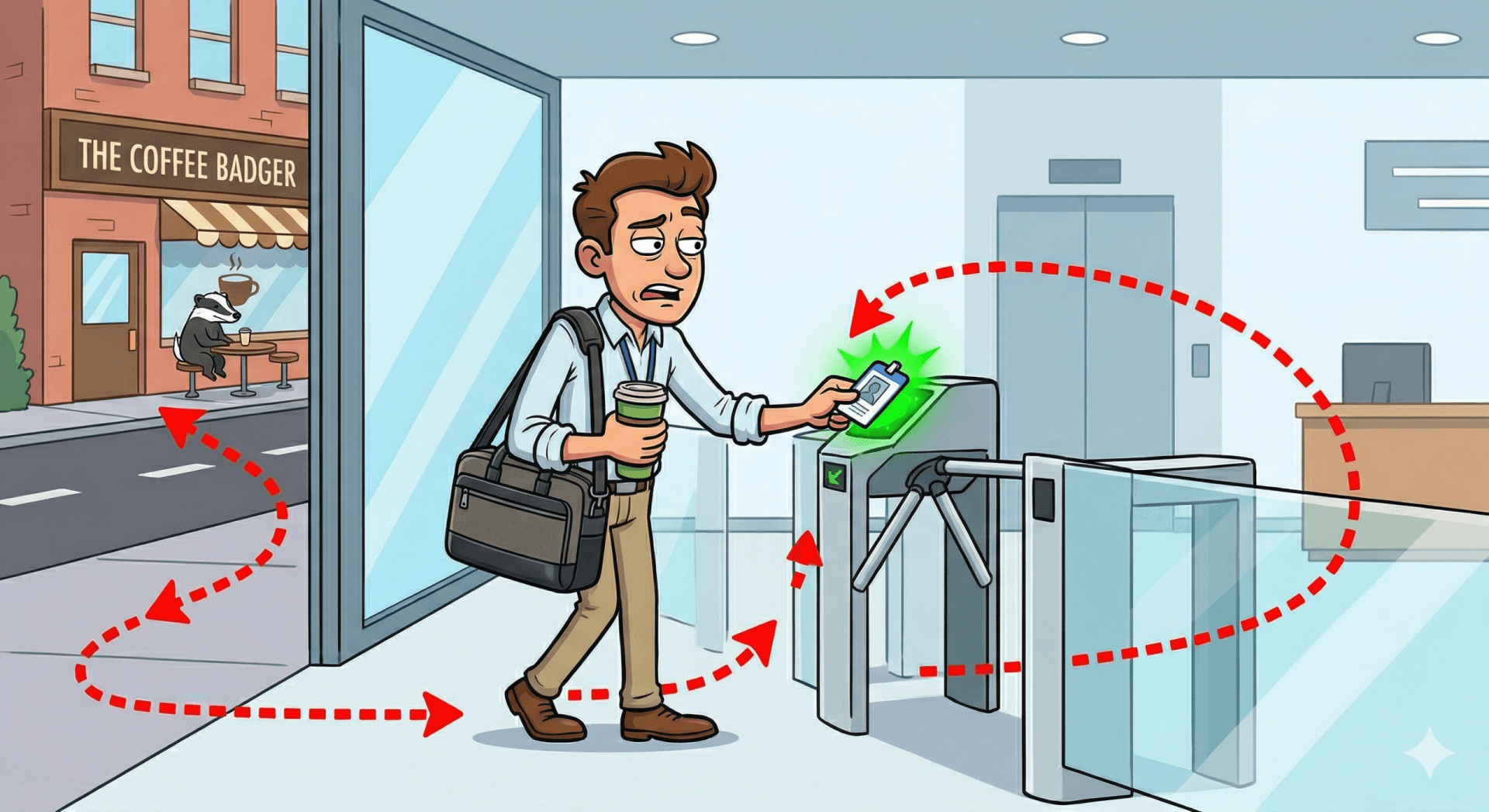
Badge data tells you who entered the building, not who sat at a desk. Someone who badges in, goes to meetings all day, and leaves never occupied a workstation. Further, employees developed the Coffee Badging model as a reaction to the Return To Office policies (RTO), where they badge-in but then step out of the building for outside coffee meetings
Surveys capture intention, not behavior. People overestimate their office attendance by 15-20% on average. Headcount data is static and doesn’t account for the significant day-to-day variation in attendance.
The result: usually organizations over-provision (wasting 20-30% of their real estate budget on empty desks) and sometimes even under-provision (creating frustrating desk shortages that drive employees away from the office).
Why Granularity Matters
Not all departments act the same. While an overall office ratio is a meaningful savings matrix, the day-to-day space management is about the behaviors and norms of each department, as represented on the space neighborhoods and floors. Employees prefer to be at the office on the same days as their colleagues they work with, for meetings and socializing, and then will utilize the desks assigned to them or the department.
How Occupancy Data Changes the Equation
Real-time occupancy sensors provide the ground truth that proxies cannot. With desk-level occupancy data from edge AI sensors, you can measure actual peak utilization (the highest percentage of desks occupied on any given day), average daily utilization (how full your floor typically is), time-of-day patterns (when desks are most and least occupied), and day-of-week variation (the difference between busy Tuesdays and quiet Fridays) and all in a granularity of neighborhood, bank of desks, types of desk and floors
This data transforms seat ratio planning from guesswork into evidence-based allocation. Instead of assuming 60% attendance, you know it’s 52% on average with a peak of 73% on Wednesdays for the sales department. Continuous desk utilisation monitoring at workstation level is what makes this granularity achievable at scale — replacing periodic surveys with always-on intelligence.
Capturing accurate utilization data at this level of granularity requires a well-designed workplace sensing infrastructure — covering sensor placement, data protocols — including why Thread mesh networking is increasingly the preferred connectivity choice in commercial offices — and integration with your space management platform.
Calculating Your Optimal Ratio
The formula is straightforward: Optimal Ratio = Headcount / (Peak Utilization × Total Desks × (1 + Buffer)).
The buffer (typically 10-15%) accounts for growth, seasonal variation, and the psychological comfort of not having a completely full floor. Most workplace experts recommend maintaining at least 85-90% peak desk availability — meaning some desks should always be open even on the busiest day.
How to Calculate Your Desk-Sharing Ratio — Step by Step
Follow these four steps to work out the right number of desks for your organisation:
Step 1: Establish your total headcount. Count all employees who could potentially come into the office — including part-time and hybrid staff, but excluding fully remote workers who never attend.
Step 2: Determine your peak daily attendance. This is the highest percentage of headcount you expect on any single day. If you do not have occupancy sensor data, a safe starting estimate is 60–70% for most hybrid offices. For more accurate data, deploy occupancy sensors for 4–6 weeks and record the daily peak.
Step 3: Add an overflow buffer. Multiply your peak attendance figure by 1.10 to 1.15 (a 10–15% buffer). This accounts for unexpected high-attendance days, visitors, and the psychological comfort of not having a completely full floor.
Step 4: Calculate desks needed. Apply the formula: Desks Needed = Headcount × Peak Attendance % × (1 + Buffer %). Your desk-sharing ratio is then simply Headcount ÷ Desks Needed. Use the interactive calculator below to run these numbers for your own organisation instantly.
Hot Desking Ratio and Desk Sharing Ratio: Setting the Right Number
The terms hot desking ratio, desk sharing ratio, and employee-to-seat ratio are often used interchangeably — but they describe slightly different concepts that matter when designing a hybrid workspace.
The hot desking ratio specifically refers to the number of employees competing for each unassigned desk in a hot-desking or activity-based working environment. A ratio of 2:1 means two employees share each desk on a rotating basis. The optimal hot desking ratio depends on your team’s attendance patterns — if your office peaks at 60% attendance, a 1.7:1 ratio provides sufficient availability with a small buffer.
The desk sharing ratio (or desk-to-employee ratio) is the inverse — the number of desks per employee. A desk sharing ratio of 0.6 means 6 desks for every 10 employees, equivalent to a 1.67:1 employee-to-seat ratio.
How to Use a Desk Sharing Ratio Calculator
To calculate your target desk sharing ratio:
- Measure peak daily attendance using occupancy sensors over 4–6 weeks, capturing your busiest days.
- Add a buffer of 10–15% to the peak to ensure desks are available when most people come in.
- Divide by headcount to get your target ratio. For example: peak attendance of 550 people in a 1,000-person company, plus 15% buffer = 633 desks needed. Desk sharing ratio = 633 ÷ 1,000 = 0.63.
- Segment by team — some departments (finance, legal) attend more regularly than others (engineering, marketing) and need a lower ratio.
PointGrab’s CogniPoint sensors automate this calculation by providing continuous desk-level occupancy data — so rather than estimating from badge data or surveys, you get the exact peaks and utilization rates needed to set ratios with confidence. The PointGrab ROI calculator lets you model the space and cost savings from different seat ratio scenarios.
Seat Utilization: The Metric Behind the Ratio
Seat utilization is the percentage of available desk-hours that are actually used. A desk that sits empty for 60% of working hours has 40% utilization. Most organizations discover through occupancy data that their average seat utilization is 40–60% — far lower than assumed — which is the evidence base for reducing the desk-to-employee ratio and consolidating real estate. Tracking seat utilization continuously is the most reliable way to validate whether your current hot desking ratio is working or needs adjustment.
Desk-Sharing Ratio Calculator
Enter your headcount and expected peak attendance to calculate the recommended number of desks and your desk-sharing ratio for a hybrid office.
Industry Benchmarks
A Practical Example
Consider a company with 1,000 employees and 600 desks, current ratio of 1.67:1. Occupancy data shows peak weekly utilization of 72% (432 desks occupied) with a typical range of 45-72%. With a 10% buffer, they could potentially reduce to 475 desks (2.1:1 ratio) while maintaining comfortable availability even at peak times
At $15,000 per desk per year (fully loaded with real estate, utilities, and services), that is ~$1.8M in annual savings — discovered through confident data that badge swipes and surveys simply cannot provide.
With an accurate data system, the analysis can go one step further, identify where the spaces and departments hot desking is already optimal, where assigned seating is what needs to be tackled and which desks can be shared (pairs of existing desks that are never used at the same time)
The PointGrab Approach
PointGrab’s edge AI sensors provide the desk-level occupancy data that makes seat ratio optimization possible. Because our sensors detect actual human presence in 1-minute intervals (not devices or badges), you get the most accurate picture of how your space is actually used. And because we deliver data via open REST APIs, you can integrate it with whatever analytics or workplace management platform you prefer. For a deeper look at how this data flows through your workplace infrastructure, see The Complete Guide to Workplace Sensing Infrastructure.
The same sensor data that optimises your desk-to-seat ratio also reveals meeting room waste. See how PointGrab measures this with the WASH Index — Wasted Available Seat Hours.
Ready to discover your actual employee-to-seat ratio?
Deploy PointGrab CogniPoint sensors above the areas of interest and understand exactly how your desks are used — so you can optimize with confidence, not guesswork.
Getting the ratio right is just the first step — see how occupancy data can improve your data-driven workplace design strategy and calculate the ROI of occupancy sensors.
Frequently Asked Questions
What is an employee-to-seat ratio?
The employee-to-seat ratio is the number of desk spaces available per employee, commonly expressed as ratios like 1:1, 1.5:1, or 2:1.
How do you determine the right seat ratio for your organization?
The optimal ratio depends on attendance patterns, work styles, and culture. Occupancy data shows which ratios work best for different teams, neighborhood and floors.
What does a 1:1 ratio mean?
A 1:1 ratio means one desk per employee, common in organizations where employees work in-office regularly.
What’s a typical ratio for the hybrid model?
Hybrid organizations commonly use 1.5:1 to 2:1 ratios, presenting the saving derived from employee’s hybrid behavior
How can occupancy sensors validate seat ratios?
Sensors provide data on peak, mean and median occupancy and space utilization, showing whether chosen ratios actually match real office attendance patterns. See our comparison of sensor technologies to understand which approach fits your environment.
Can seat ratios be different for different teams?
Yes, different departments often have different attendance patterns and collaboration needs, supporting different optimal seat ratios. Further, these behaviors chang over time…
What happens if seat ratios are too low?
Insufficient seating creates employee frustration when they can’t find desks and might occupy a meeting room or other spaces. This is hurting office experience and reducing in-office attendance.
What is a good office seat ratio?
A good office seat ratio for hybrid workplaces typically falls between 1.5:1 and 2:1 — meaning 1.5 to 2 employees per available desk. However, the right ratio varies significantly by industry and attendance patterns. Financial services and legal firms tend to sit closer to 1.2:1 due to daily in-office expectations, while technology and media companies with high remote flexibility can support 2:1 or higher. The best way to determine your ideal ratio is through real occupancy sensor data rather than estimates — measuring actual peak utilization across different days and departments before committing to a space reduction.
What is the hot desking ratio and how do I calculate it?
The hot desking ratio is the number of employees per unassigned desk in a hot-desking or activity-based working environment. To calculate it: measure your peak daily attendance over 4–6 weeks using occupancy sensors, add a 10–15% buffer, and divide by the number of available desks. For example, if peak attendance is 600 out of 1,000 employees, add 15% buffer to get 690 — meaning you need a minimum of 690 desks, giving a hot desking ratio of 1.45:1. The right hot desking ratio varies by industry: technology companies typically run 1.8:1 to 2.5:1, while financial and legal firms with higher in-office attendance stay closer to 1.2:1 to 1.5:1.
What is seat utilisation and why does it matter?
Seat utilisation is the percentage of desk-hours that are actually used — calculated as (occupied desk-hours ÷ total available desk-hours) × 100. A desk occupied for 4 hours in an 8-hour workday has 50% utilisation. Most organisations discover through occupancy sensor data that average seat utilisation is 40–60%, far lower than expected. This data is the evidence base for adjusting the employee-to-seat ratio: if average utilisation is 45%, the office is significantly over-desked and real estate consolidation is justified. Continuous seat utilisation monitoring via PointGrab sensors allows ongoing validation as attendance patterns evolve.
What is a desk sharing ratio calculator and how do I use one?
A desk sharing ratio calculator converts your attendance data and headcount into a recommended desk count. The basic formula is: (Peak daily attendance × 1.10–1.15 buffer) ÷ Total headcount = desk sharing ratio. For example, 550 peak attendance with 10% buffer ÷ 1,000 employees = 0.605 — meaning approximately 605 desks are needed. PointGrab’s ROI calculator extends this by modelling the cost savings from reducing your desk count: enter current desk count, measured peak attendance, real estate cost per desk, and it returns the recommended ratio, potential desk reduction, and projected annual savings.
What is a good desk-to-employee ratio?
A good desk-to-employee ratio for a hybrid office is typically 0.5–0.7 desks per employee — equivalent to an employee-to-seat ratio of 1.4:1 to 2:1. For every 10 employees, that means providing 5–7 desks. The right figure depends on your measured peak attendance: if the busiest day sees 55–60% of staff in the office, a ratio of around 0.65 desks per person (with a 10–15% buffer) is usually sufficient. Ongoing desk utilisation monitoring is the most reliable way to validate and refine this number as attendance patterns evolve.
Related Reading
- The Complete Guide to Occupancy Sensors for Modern Offices
- Desk Occupancy Sensors for Hybrid Offices: Real-Time Utilisation Monitoring
- Return-to-Office: What the Occupancy Data Actually Shows
- Occupancy Sensor Technologies Compared: PIR, LiDAR, Wi-Fi & More
- The ROI of Occupancy Sensors: Building the Business Case
- Data-Driven Workplace Design: Using Occupancy Intelligence