
Building an Application-Agnostic Occupancy Data Layer: Cloud-Based REST APIs and the Case Against Vendor Lock-In
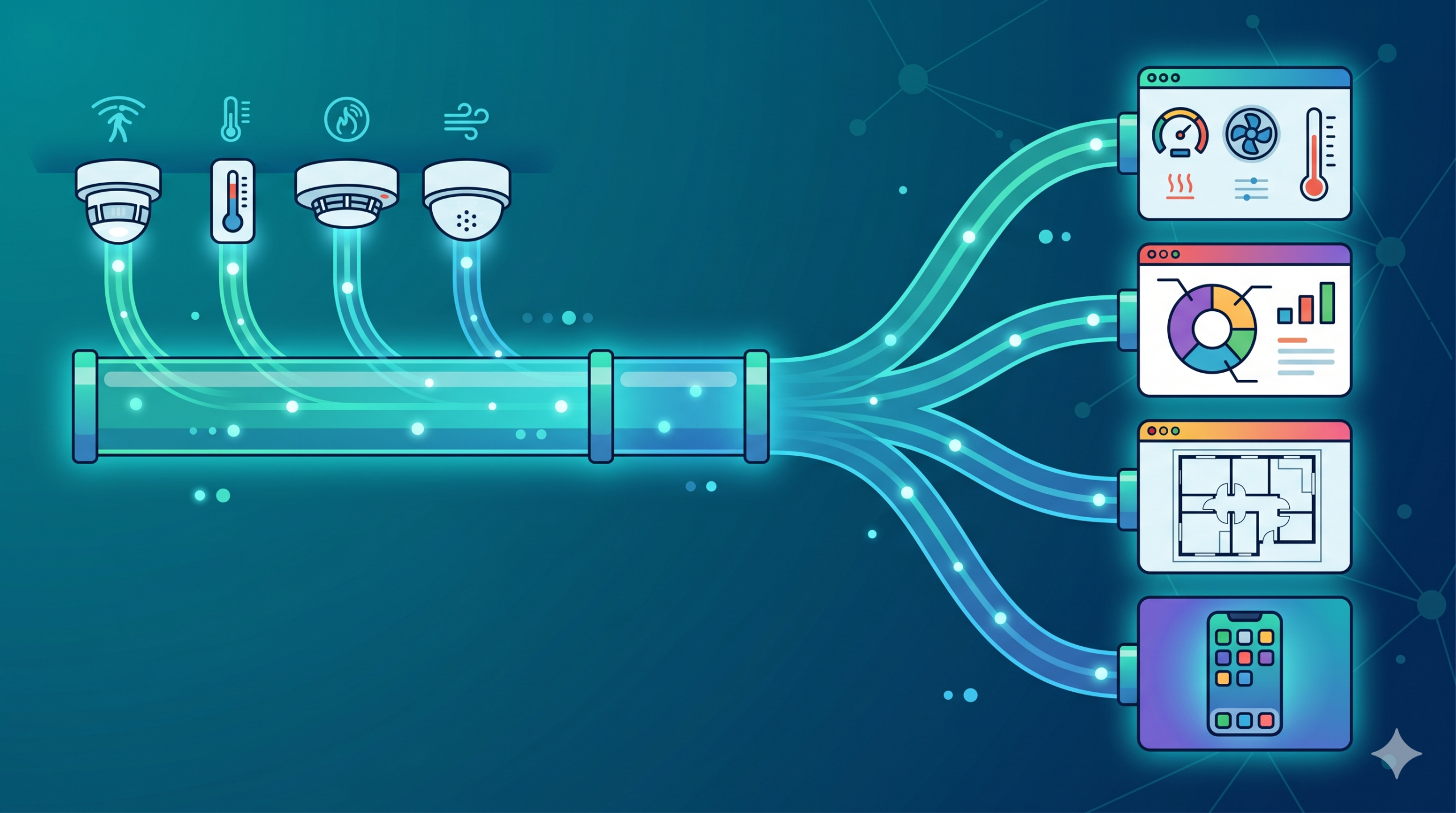
An application-agnostic occupancy data layer is a sensing architecture that delivers occupancy data—headcounts, coordinates, utilization metrics—through open, standardized protocols like cloud-based REST APIs, enabling organizations to feed that data into any analytics platform, building management system, digital signage or workplace tool they choose. Unlike traditional occupancy sensing solutions that lock customers into proprietary analytics platforms, this approach inverts the relationship: the sensor becomes a data source, not a delivery vehicle for a particular vendor’s dashboard.
In an era where workplace technology stacks are becoming increasingly complex—spanning facilities management, real estate optimization, employee experience, and sustainability—organizations cannot afford to be locked into a single vendor’s interpretation of their own data. Further, with today’s AI capabilities introducing innovation and customization at scale, such lock up is short lived. An application-agnostic occupancy data layer is not just a technical architecture choice; it’s a strategic one that determines whether your occupancy sensors serve your business needs or your sensors force your business to serve a vendor’s platform.
The Vendor Lock-In Problem in Workplace Sensing
Vendor lock-in in workplace sensing operates along a deceptively simple formula: offer customers a “free” analytics dashboard bundled with the sensor, then gradually migrate the customer’s operational decisions to that platform. Once the organization has built workflows, trained staff, integrated downstream systems, and made strategic decisions based on that vendor’s interface, switching becomes economically and operationally prohibitive—even when a competitor offers superior functionality, pricing, or architectural flexibility.
How Proprietary Platforms Create Dependency
- Dashboard Addiction: Users become familiar with a specific interface and reporting layout. Retraining on a new platform carries hidden organizational costs (time, productivity, user adoption friction).
- Proprietary Data Models: Raw sensor data is immediately transformed into a vendor-specific schema. Your occupancy data isn’t stored in standard formats; it’s stored in the vendor’s proprietary database, making export and migration painful or impossible.
- Downstream Integration Dependencies: Once your occupancy data flows into a vendor’s platform, other systems (your BMS, IWMS, workplace booking system) may become dependent on that vendor’s APIs or data format. Removing the vendor requires architectural changes across multiple systems.
- Artificial Feature Gates: Vendors often restrict raw data access to customers on their premium tier, using “open APIs” and “integrations” as marketing features while keeping true data ownership out of reach.
The Real Cost of Switching
The stated cost of switching vendors is usually minimal: “Just buy our sensor instead.” But the hidden costs are substantial:
- Data Migration: Historical occupancy data is often locked in proprietary formats. Extracting requires custom integration work, and data loss is common.
- Workflow Reconstruction: Teams have built scheduled reports, automated alerts, and decision-making processes around the existing applications platform. Those workflows don’t port; they must be rebuilt on the new platform.
- Integration Rework: If your BMS, IWMS, or BI tool receives occupancy data from Vendor A’s API, migrating to Vendor B’s sensor means reworking those integrations—potentially requiring vendor support and causing service disruptions.
- Organizational Knowledge Loss: Staff trained on Vendor A’s platform must be retrained. Documentation and runbooks become obsolete. Decision-making frameworks built on Vendor A’s metrics may not map to Vendor B’s interface.
Why “Free Analytics Dashboard” Is the Most Expensive Feature
The analytics dashboard is not free. It’s a lock-in mechanism priced into the sensor. Customers who believe they’re getting a bargain (“sensor + dashboard for $X”) are actually paying a lock-in tax that will compound over the life of the deployment. Here’s why:
- You cannot replace it. If the dashboard doesn’t meet your needs, you cannot use a competitor’s dashboard without migrating sensors.
- You are funding it through vendor margins. The cost of maintaining that dashboard is built into the sensor price and lock-in duration.
- It prevents best-of-breed architecture. Your organization may already have a BI tool (Tableau, Power BI, Qlik) that excels at visualization and analytics. Vendor lock-in forces you to use an inferior analytics platform instead.
- It slows innovation. New use cases are coming up as the facility management and workplace management needs evolve. New applications will need usage data, and you need that full usage data to be available for them to multiply their value
- It locks your data. The moment occupancy data enters that dashboard, it’s no longer your data in any meaningful sense—it’s the vendor’s data, accessible through their interface on their terms.
Industry Examples of the “end to end solution” Consequences
- VergeSense: Customers who deploy VergeSense sensors receive data through Meridian, VergeSense’s proprietary platform. Moving to a different analytics system requires sensor migration because data is not available through open APIs in raw form.
- Density: Occupancy data flows into Atlas, Density’s platform. While Density now offers some third-party integrations, raw data access is limited to premium tiers, and switching vendors still requires hardware replacement.
- XY Sense: The Insights Platform bundles sensors with analytics. Introducing new/different occupancy sensor vendor means losing the accumulated insights and retraining teams on a new interface.
What Application-Agnostic Actually Means
“Application-agnostic” is an industry term that has been diluted by marketing. Many vendors claim to be open while maintaining subtle forms of lock-in. Understanding what application-agnostic truly entails requires distinguishing between data ownership, data access, and open architecture.

Data Ownership vs. Data Access
- True Data Ownership: You own the raw occupancy data. You can export it at any time in standard formats (CSV, JSON, database dumps). You can use it with any third-party tool without restrictions from the sensor vendor.
- Restricted Data Access: The vendor allows you to integrate third-party tools through their API, but raw data is not directly accessible. You can only access data through the vendor’s data model, in the vendor’s schema. This is “access,” not “ownership.”
Protocol Standards: MQTT, REST, BACnet, Modbus
- MQTT (Message Queuing Telemetry Transport): An open, lightweight pub-sub protocol for real-time data streaming. Standardized by ISO and OASIS. Designed for IoT and resource-constrained environments.
- REST APIs (Representational State Transfer): HTTP-based request-response protocol for querying data on-demand. Stateless, widely supported, excellent for integrations with large variety of business applications.
- BACnet (Building Automation and Control Networks): Standardized protocol for building management systems. Enables direct sensor-to-BMS communication without a cloud platform.
- Modbus: Open industrial protocol for device communication. Common in legacy building systems. Supporting Modbus ensures compatibility with older infrastructure.
API-First Architecture Principles
An API-first architecture means the sensor platform is designed around programmatic data access from the ground up, not as an afterthought. Key principles:
- Data is the primary output: The sensor exists to generate data that can be consumed by any system.
- Management is the primary input: the sensors are fully manageable, reporting status, logs and events, and receiving firmware updates and configurations.
- APIs are public and documented: The same APIs that power the vendor’s own application layer (dashboard, controls, automations) are available to third-party developers. Swagger type document/UI keeps the API documentation updated
- Standards-compliant: The APIs use standard protocols that developers already know, reducing integration friction.
- No hidden dependencies: You can deploy the sensor, extract data and insert management via REST API, and build your own management and analytics without ever touching the vendor’s dashboard.
The Difference Between “Integrations Available” and Truly Open Architecture
Many vendors market “integrations with 50+ platforms” as evidence of openness. But integrations can be superficial. A true open architecture means:
- You can build your own integrations. The APIs are documented and available. You are not limited to pre-built connectors or integration fees.
- Raw data is accessible. You’re not limited to the 5 metrics the vendor chose to expose. You can build custom applications using the full real time and historic occupancy data set.
- Integration is standardized. You integrate via REST API, not proprietary webhooks or custom data formats that work only with that vendor’s platform.
- The vendor doesn’t control your downstream tools. If you want to stream occupancy data into a third-party analytics tool, you can—the vendor doesn’t have to approve it or maintain an “official integration” State.
Understanding MQTT in the Building IoT Ecosystem
MQTT has become a common standard for IoT data streaming, particularly in building automation and smart buildings. It offers a lightweight, scalable, real-time data transport that sits above the sensor hardware and below any proprietary analytics platform.
What MQTT Is and Why It Matters for Building IoT
MQTT is a publish-subscribe messaging protocol. Sensors publish messages to an MQTT broker which communicates with the data store. The architecture is decoupled: sensors don’t need to know who consumes their data, and consumers don’t need to know where data originates.
For occupancy sensing, this decoupling is transformative. Instead of sending occupancy data to Vendor A’s analytics platform (and only Vendor A’s platform), a sensor publishes data to an MQTT broker on the cloud platform. Your BMS can subscribe. Your occupancy analytics tool can subscribe. Your custom dashboard can subscribe. Your data warehouse can subscribe. All simultaneously, all with zero vendor involvement, leveraging widely understood cloud REST interface.
QoS Levels and When to Use Each
MQTT defines three Quality of Service (QoS) levels for message delivery:
- QoS 0 (At Most Once): Fire and forget. Message may be delivered once, or not at all. Lowest overhead. Acceptable for high-frequency occupancy updates where a single missed update is inconsequential.
- QoS 1 (At Least Once): Message is guaranteed to arrive at least once, but may arrive multiple times. Requires acknowledgment. Suitable for occupancy metrics where duplicate detection is simple (use timestamps).
- QoS 2 (Exactly Once): Four-way handshake guarantees exactly one delivery. Highest overhead. Use for critical events (occupancy threshold breaches, alerts) where duplicates cause operational problems.
An occupancy data system would select the right balance, usually QoS 1: reliable delivery with acceptable overhead.
Securing MQTT in Enterprise Building IoT
While MQTT is lightweight and flexible, its security model is not inherent to the protocol itself. MQTT defines messaging behavior, not transport security. In practice, secure deployments rely on layering standard internet security mechanisms, most commonly TLS.
Transport Security with TLS
In enterprise environments, MQTT traffic is almost always encrypted using TLS, typically over port 8883. This ensures:
- Encryption in transit: All messages between sensors, brokers, and subscribers are encrypted, preventing interception or eavesdropping
- Integrity protection: Messages cannot be modified in transit without detection
- Server authentication: Clients verify the broker identity using certificates
Without TLS, MQTT operates in plaintext, which is unsuitable for any production-grade building system.
Sensor Authentication Models
Beyond encryption, MQTT requires a method to authenticate devices and applications connecting to the broker. Common approaches include:
- Username and password: Simple but weaker, often used in less critical deployments
- Client certificates (mTLS): Stronger model where both client and broker authenticate each other using X.509 certificates
- Token-based authentication: Integration with cloud IAM systems such as those in Amazon Web Services or Microsoft Azure
For enterprise IoT, certificate-based authentication is generally considered the baseline, especially when devices are deployed at scale.
Authorization and Topic-Level Access Control
Once authenticated, clients must be restricted in what they can publish or subscribe to. MQTT brokers enforce this through Access Control Lists:
- Sensors are typically limited to publishing only to their assigned topics
- Applications are restricted to subscribing only to relevant data streams
- Wildcard subscriptions must be carefully controlled to avoid unintended data exposure
Poorly configured topic permissions are one of the most common security weaknesses in MQTT deployments.
Broker Risks and Network Design
Because MQTT relies on a central broker, its exposure becomes a critical design decision:
- Public cloud brokers simplify integration but expand the attack surface
- Private or VPC-isolated brokers reduce exposure but require more infrastructure management
- On-premise brokers provide control but introduce operational overhead and patching responsibility
In all cases, broker patching and vulnerability management is required, as well as network segmentation and firewall policies that are essential to prevent unauthorized access.
Real-Time Streaming vs. Polling Patterns
MQTT enables true real-time streaming: sensors publish updates continuously; subscribers continuously receive data. This is different from polling (repeatedly asking “do you have new data?”), where latency depends on polling frequency.
For occupancy sensing, streaming enables use cases that polling cannot support:
- Sub-second occupancy alerts: Trigger an alert the moment a space is used (for lighting control for example)
- Real-time heat maps: Build live floor plans showing change in occupancy by zones, updated as people move.
REST APIs for Occupancy Intelligence
While MQTT excels at real-time streaming, REST APIs are ideal for widely available query-based access to occupancy data. REST is the lingua franca of web and enterprise applications: every BI tool, analytics platform, and custom dashboard speaks HTTP.

When REST Makes More Sense Than MQTT
- Historical data queries: “Show me occupancy for Zone 3A last Tuesday between 9 AM and 5 PM.” REST is perfect for time-range queries.
- On-demand analytics: Your BI tool doesn’t need to stream all occupancy data continuously; it needs snapshots at specific timestamp.
- Third-party tool integrations: Tableau, Power BI, Qlik all consume REST APIs natively. MQTT requires a bridge layer.
- Conditional access: REST enables complex queries with filters: “occupancy > 10 AND utilization < 50%”.
API Design Patterns for Occupancy Data
A well-designed occupancy API exposes endpoints data like:
- GET /api/v1/buildings/{building_id}/zones/{zone_id}/occupancy — Current occupancy for a zone
- GET /api/v1/buildings/{building_id}/zones/{zone_id}/occupancy/history?start=&end= — Historical occupancy within a time range
- GET /api/v1/buildings/{building_id}/occupancy/summary — Summary metrics for the entire building
- GET /api/v1/buildings/{building_id}/zones/{zone_id}/occupancy/coordinates — Precise person locations
Each endpoint returns JSON with clear schema definitions, enabling any tool to parse and consume the data.
An advanced API allows all the same data to be subscribed to, thus get the data pushed periodically or on change
Things to look for in REST Authentication and Security
- API Keys: Simple, suitable for server-to-server integrations. Keys should be revocable and scoped to specific resources.
- OAuth 2.0: Industry standard for delegated access. Enables end-users to grant third-party applications access to their data without sharing passwords.
- Role-Based Access Control (RBAC): Not all users should see all buildings. An integrator at Acme Corp should only access Acme’s data, not Acme’s competitors.
Rate Limiting and Data Freshness
To make this system effective for the application a public API must prevent abuse through rate limiting (e.g., “1000 requests per hour per API key”). For occupancy data, the service level agreement should specify data freshness: “Occupancy data is updated every X seconds.” This allows consumers to know whether a query reflects data that is 5 seconds, 5 minutes, or 5 hours old.
Webhook Patterns for Event-Driven Architectures
REST is inherently pull-based (you ask for data), but webhooks enable push-based events: “When occupancy exceeds 15 in Zone 3A, send a POST request to my URL.” This enables event-driven architectures where downstream systems react to occupancy changes in real time, without requiring those systems to poll continuously.
Integration Patterns for Enterprise Buildings
A application-agnostic occupancy data layer gains value only when integrated into the broader building management ecosystem. Here are proven patterns for connecting occupancy data to systems that drive operational decisions.
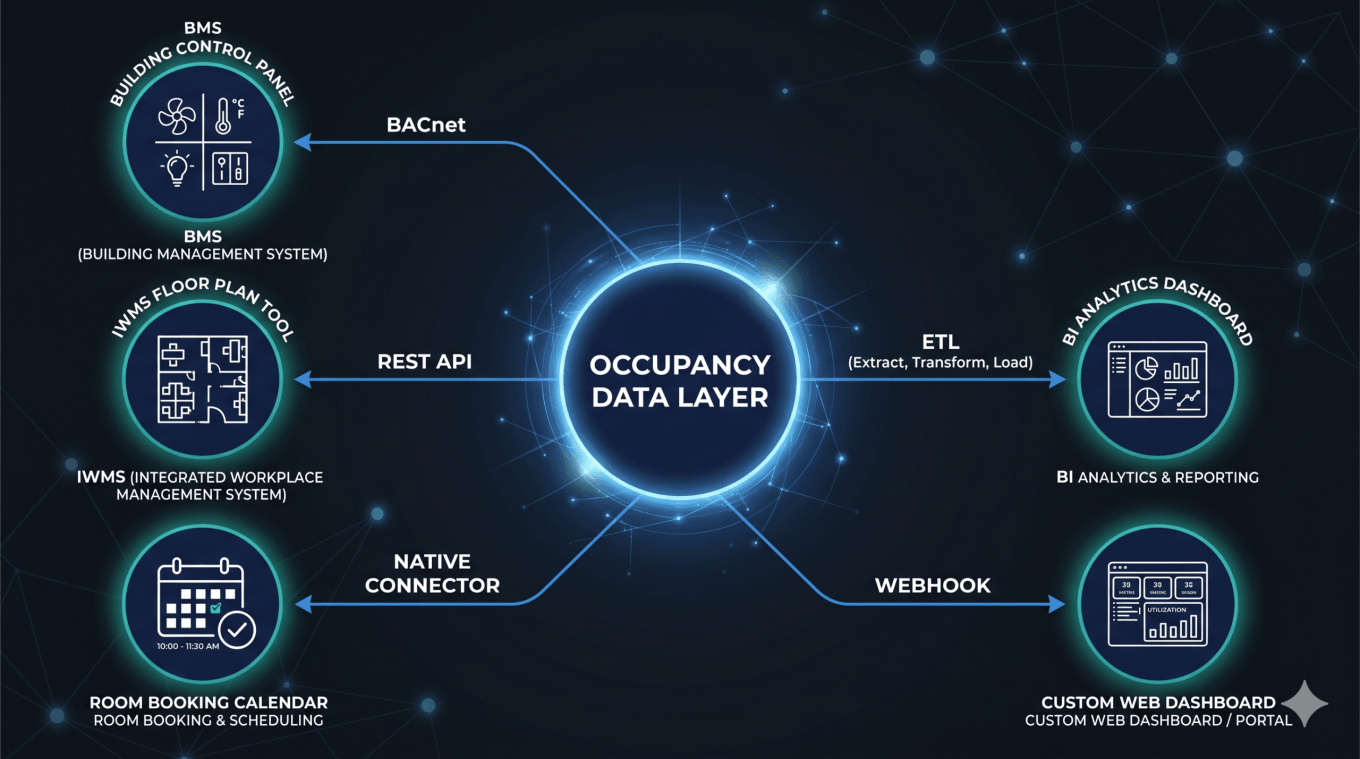
BMS Integration (e.g. Siemens, Honeywell, JCI, Schneider)
Building Management Systems (BMS) control HVAC, lighting, access, and security. Occupancy data should feed directly into the BMS to enable responsive automation:
- BACnet Native: Deploy a BACnet gateway that translates occupancy data into BACnet objects. The BMS reads occupancy as a standard point, enabling rules like “if Zone 3A occupancy > 10, set temperature to 72°F.”
- API Bridge: Modern BMS have cloud interface that uses a middleware service to poll occupancy via REST API and pushes data into the BMS through its native API (Honeywell WebAPI, Siemens Building Automation Protocol, etc.).
IWMS/CAFM Integration (e.g Planon, Eptura, FM:Systems)
Integrated Workplace Management Systems (IWMS) manage space utilization, real estate optimization, and maintenance. Occupancy data drives portfolio decisions:
- Native Connectors: Many IWMS platforms offer pre-built connectors to occupancy APIs. Occupancy data syncs into the IWMS database, feeding utilization reports and space optimization workflows.
- Data Lake Approach: Stream occupancy data into a data warehouse, then pull it into the IWMS via batch ingestion. This provides historical context for trend analysis.
Workplace Booking Systems (e.g. AppSpace, Robin, Envoy, Condeco)
Workplace booking platforms let employees reserve desks and spaces. Occupancy data validates booking accuracy and reveals no-show rates:
- Decision support: Display Real-Time occupancy in the booking system. Employees can see which areas are crowded and book accordingly, plan their walk on the floor, avoid opening door of meeting room when someone is in.
- No-Show Detection: Compare bookings to actual occupancy. In real time release booked assets. Historical no-show rates indicate demand forecasting failures. Repeating no show for specific space might indicate desired but unusable space
- Automatic check-in: reduce burden on employees by marking a booked asset as “used” when its being populated
- Ghost presence: indication that a space is empty but might not be bookable as objects left in the space
Custom Dashboard Development
Organizations with unique requirements can build custom dashboards consuming data directly:
- Web Dashboards: React, Vue, or Angular frontends that subscribe to MQTT topics or poll REST endpoints, displaying real-time occupancy heat maps.
- Mobile Apps: Native iOS/Android apps that show occupancy of nearby spaces, guiding employees to available areas.
Data Warehouse / BI Tool Integration
For strategic analysis, occupancy data belongs in the data warehouse alongside HR, real estate, and facility data:
- ETL Pipelines: Batch processes (daily, hourly) extract occupancy data via REST API and load into the warehouse.
- BI Tool Connections: Connect Tableau, Power BI, or Qlik directly to occupancy data, enabling business users to self-serve analytics without waiting for IT teams.
Evaluating Vendors on Data Openness
When evaluating occupancy sensor vendors, questions about data openness are not optional – they determine long-term flexibility and portability. Use this evaluation framework:
|
Evaluation Criterion |
Questions to Ask |
|
Protocol Support |
Do you support MQTT? REST APIs? BACnet? Modbus? WebSockets? |
|
Raw Data Access |
Can I access raw occupancy data (headcount, coordinates, timestamps) directly? Any restrictions? |
|
Third-Party Analytics |
Can I send this data to my own analytics platform, BI tool, or data warehouse? |
|
BMS Integration |
Do you offer native integrations with major BMS systems (Siemens, Honeywell, JCI) or support middleware offer (KodeLabs, Metrikus etc)? |
|
Data Portability |
If I switch vendors, can I export my historical data in a standard format? |
|
API Documentation |
Is your API documentation public and maintained? Do you offer SDKs? |
|
No Forced Dashboard |
Can I use your sensor without their analytics platform? |
|
Integration Freedom |
Am I limited to pre-built connectors, or can I build custom integrations? |
|
Costs of Access |
Is the access to the data always free? Can I add as many application as I need? Can I switch between integrated applications? |
A vendor that hesitates on any of these questions, offers qualified answers (“REST API available only on Enterprise tier”), or emphasizes their own dashboard over raw data access is positioning vendor lock-in as a feature, not a limitation.
Conclusion: Build Your Architecture, Not Theirs
Vendor lock-in in workplace sensing is not accidental; it’s baked into the business model. By tying customers to a proprietary analytics platform, vendors reduce churn, increase subscription costs, and defend against competition. The cost is borne by customers – in lost flexibility, architectural constraints, and inability to evolve their technology stack independently.
An application-agnostic occupancy data layer inverts this dynamic. By delivering occupancy data through open, standardized protocols, vendors focus and prove their confidence in the quality of their data. They compete on ease of deployment, hardware quality, the accuracy of their sensors data, and the openness of the data system. Organizations retain freedom to choose analytics tools, integrate with existing systems, and evolve without being held hostage.
The future of workplace technology is not a single integrated platform controlled by a sensor vendor. It’s a data layered architecture in which data is decoupled, open, standards-based and enables organizations to compose best-of-breed tools into coherent architecture. PointGrab’s CogniPoint sensors exemplify this philosophy: precise edge AI occupancy data (exact headcount, sub-meter positioning, no images) delivered via cloud-based RESTful API. Connect to your BMS, your IWMS, your booking system, your analytics platform, or your custom IT driven application. The data is yours.
When evaluating occupancy sensors, ask yourself: Am I buying data, or am I being a point solution? If the vendor’s pitch emphasizes their analytics dashboard more than their data architecture, you’re being sold lock-in. Choose sensors that prioritize data openness, and your technology strategy will thank you.
For the networking layer that makes this possible, see Thread mesh networking for commercial buildings. And for the data problem this layer solves, read The Workplace Data Problem: Why Your Office Needs a Spatial Data Layer.
Frequently Asked Questions
Q1: What is a application-agnostic occupancy sensor?
A application-agnostic occupancy sensor is a device that measures occupancy (headcount, coordinates, duration) and streams raw and aggregated data through open standard protocols (MQTT, REST APIs) without requiring integration through a proprietary analytics platform. The sensor is decoupled from any specific software platform, enabling organizations to choose their own analytics tools, BMS systems, and integrations.
Q2: What is MQTT and how is it used in building sensors?
MQTT (Message Queuing Telemetry Transport) is a lightweight publish-subscribe protocol designed for IoT devices. Building sensors publish occupancy data to an MQTT broker; any client (BMS, analytics platform, custom dashboard) subscribes to those messages in real time. MQTT enables true decoupling: sensors don’t care who consumes their data, and consumers don’t care where data originates.
Q3: How do REST APIs work with occupancy data?
REST APIs expose HTTP endpoints that return occupancy data in JSON format. A consumer can query all data, historical occupancy, current utilization, or specific metrics via standard HTTP requests. REST is ideal for third-party integrations, on-demand queries, and tools that don’t require real-time streaming.
Q4: Can I use occupancy sensor data with my existing BMS?
Yes, if the sensor offers either BACnet connectivity (most BMS systems understand BACnet) or API integration through your BMS vendor’s integration layer. An application-agnostic sensor will provide multiple integration pathways; a vendor-locked sensor may support “integrations” only through proprietary bridges.
Q5: What questions should I ask vendors about data lock-in?
See the vendor evaluation table in Section 7. Key questions: Do you offer MQTT? REST? Can I access raw data? Can I export historical data? Can I use a third-party analytics tool? If a vendor hedges on these questions, they’re protecting lock-in.
Related Articles
The Complete Guide to Workplace Sensing Infrastructure: Architecture, Protocols, and Data Flow
How Occupancy Sensors Power Smart Building Automation: HVAC, Lighting, and Beyond
Why Application-Agnostic Occupancy Data Matters: Avoiding Vendor Lock-In
Occupancy Sensors and Privacy: A GDPR-Ready Guide for European Workplaces